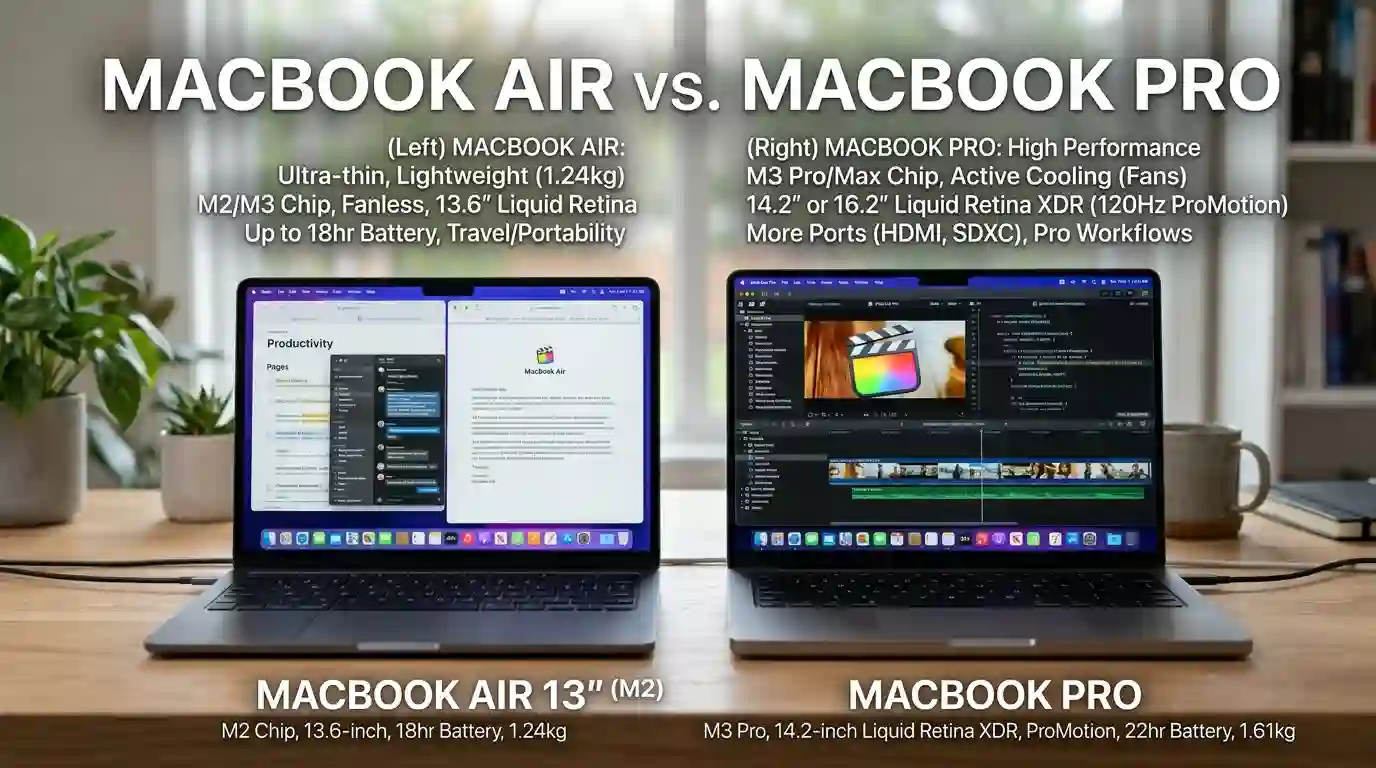
The MacBook Air is the better choice for most everyday users because it is lighter, quieter, and less expensive while still offering strong M5 performance. The MacBook Pro is better for demanding professional work because it has active cooling, a brighter 120Hz Liquid Retina XDR display, more ports, and greater sustained performance.
Key Takeaways
- Choose the MacBook Air for school, office work, browsing, writing, SEO, coding, and general productivity.
- Choose the MacBook Pro for sustained video editing, demanding development, 3D work, and other intensive workloads.
- The Air is thinner, lighter, and fanless, while the Pro has active cooling.
- The Pro has a superior 120Hz Liquid Retina XDR display, HDMI, SDXC, and an additional Thunderbolt port.
- Do not pay for the Pro simply because it is called “Pro.” Your workload should determine whether the extra cost is worthwhile.
MacBook Air vs MacBook Pro: Quick Comparison
Apple’s current MacBook lineup makes the comparison more interesting than it used to be. The 2026 MacBook Air comes in 13-inch and 15-inch versions with the M5 chip. The 14-inch MacBook Pro is available with M5, while higher-end 14-inch and 16-inch models use M5 Pro or M5 Max.
| Feature | MacBook Air | MacBook Pro |
|---|---|---|
| Main sizes | 13.6″, 15.3″ | 14.2″, 16.2″ |
| Standard chip | M5 | M5, M5 Pro, M5 Max |
| Cooling | Fanless | Active cooling |
| Display | Liquid Retina, 60Hz | Liquid Retina XDR, up to 120Hz |
| Brightness | Up to 500 nits | Up to 1,600 nits peak HDR |
| Thunderbolt ports | 2 | 3 |
| HDMI | No | Yes |
| SDXC | No | Yes |
| Battery claim | Up to 18 hours | Up to 24 hours on 14-inch M5 |
| Weight | About 2.7–3.3 lb | About 3.4 lb for 14-inch |
| Best for | Everyday and mobile work | Professional workloads |
The Air’s advantage is not that it is a weak version of the Pro. Its M5 chip is capable of handling demanding everyday work. The major difference appears when you keep pushing the computer for long periods.
Performance: Air vs Pro
Performance is where buyers often make the wrong decision.
The 13-inch MacBook Air M5 has a 10-core CPU and can be configured with up to a 10-core GPU, while the 14-inch M5 MacBook Pro also uses a 10-core CPU and 10-core GPU. This means the basic M5 Air and M5 Pro are not separated simply by the name “Pro.”
When the MacBook Air Is Fast Enough
For browsing, Microsoft Office, Google Docs, email, research, content writing, SEO tools, Zoom meetings, coding, photo management, and ordinary multitasking, the Air is more than capable.
It is also completely fanless. That means there is no cooling fan constantly spinning during normal use. For people who value a quiet workspace, this is a genuine advantage.
Apple offers the 13-inch Air with 16GB unified memory as standard, with 24GB and 32GB options, while storage can be configured up to 4TB.
When the MacBook Pro Makes More Sense
The Pro’s biggest advantage is sustained performance.
Its active cooling system allows the computer to maintain high performance during workloads that continue for a long time. That matters for large software builds, long video exports, 3D rendering, complex creative projects, and intensive multitasking.
This distinction is important. If you edit a short video occasionally, the Air may be enough. If you export large projects every day, the Pro becomes much easier to justify.
The higher-end M5 Pro and M5 Max models also move far beyond the standard M5 in CPU and GPU capability, making them a different class of machine for professional users.
Display and Design
The MacBook Air has a 13.6-inch or 15.3-inch Liquid Retina display with a 60Hz refresh rate and up to 500 nits brightness. The 13-inch model weighs about 2.7 pounds, while the 15-inch version weighs about 3.3 pounds.
The 14-inch MacBook Pro uses a 14.2-inch Liquid Retina XDR display with ProMotion up to 120Hz. It can reach 1,000 nits sustained brightness and 1,600 nits peak brightness for HDR content.
That makes the Pro especially attractive for photographers, video editors, designers, and anyone who spends hours looking at high-quality visual content.
The Air wins on portability. The Pro wins on display quality.
Battery Life
Battery life is excellent on both models, but Apple’s ratings give the Pro an advantage.
The 13-inch M5 MacBook Air is rated for up to 18 hours of video streaming and up to 15 hours of wireless web use.
The 14-inch M5 MacBook Pro is rated for up to 24 hours of video streaming and up to 16 hours of wireless web use.
These are Apple’s controlled test figures, so real-world battery life will vary with brightness, applications, workload, and settings.
For most users, though, either machine can comfortably handle a full work or study day.
Ports and Connectivity
This is one of the clearest differences.
The MacBook Air has two Thunderbolt 4 USB-C ports, a MagSafe 3 charging port, and a 3.5mm headphone jack.
The MacBook Pro adds a third Thunderbolt 4 port, HDMI, and an SDXC card slot.
If you regularly connect cameras, external storage, monitors, projectors, or other professional equipment, the Pro can save you from carrying multiple adapters.
For someone who mainly uses wireless accessories and a single external display, the Air’s simpler port selection may not matter much.
Which MacBook Is Better for Different Users?
Students and Everyday Users
MacBook Air wins.
Students generally benefit more from low weight, quiet operation, long battery life, and a lower purchase price than from professional-level sustained performance.
The 13-inch Air is particularly easy to carry around campus. The 15-inch model is better if you want more screen space without moving to the Pro.
Writers, SEO Professionals, and Office Workers
MacBook Air wins for most people.
If your daily work involves Chrome tabs, documents, spreadsheets, SEO platforms, email, research, content management systems, video meetings, and social media, you probably do not need a MacBook Pro.
Spending the extra money on more memory or storage may make more sense than upgrading to the Pro.
Programmers and Developers
It depends on the workload.
The Air is excellent for web development, front-end work, normal full-stack development, and many coding workflows.
A Pro becomes more attractive if you regularly compile very large projects, run multiple virtualized environments, use resource-heavy development tools, or work with demanding local AI and data workloads.
Photo and Video Editors
MacBook Pro wins for serious professional work.
The Air can handle photo editing and many video-editing projects. However, the Pro’s XDR display, ProMotion, active cooling, additional ports, and higher-end chip options make it better suited to demanding creative workflows.
For occasional editing, save the money and get the Air. For professional production, the Pro is easier to recommend.
MacBook Air vs MacBook Pro: Price and Value
Price is one of the biggest reasons to choose the Air.
Apple’s U.S. store currently lists the 13-inch MacBook Air from $1,299 and the 15-inch model from $1,499. Apple’s March 2026 announcement originally listed the Air at $1,099 and $1,299 respectively, so current configurations and pricing should be checked before purchase.
The 14-inch MacBook Pro with M5 started at $1,699 and now comes with 1TB storage as its standard configuration.
That means the real comparison is not simply “cheap Air vs expensive Pro.” You should compare similarly configured machines.
For example, if you need more memory and storage, a higher-spec Air can move closer to the price of an entry-level Pro. At that point, ask yourself whether the Pro’s display, cooling, ports, and battery life are worth the difference.
Which MacBook Should You Buy?
Choose the MacBook Air if you want:
- A lightweight laptop
- Quiet, fanless operation
- Excellent everyday performance
- Long battery life
- A lower price
- A machine for school, business, writing, SEO, browsing, and normal coding
Choose the MacBook Pro if you want:
- Sustained high performance
- A 120Hz XDR display
- HDMI and SDXC
- More Thunderbolt connectivity
- Better support for professional creative workflows
- Higher-end M5 Pro or M5 Max performance
For most people, I would choose the MacBook Air. For professionals who know they need the Pro’s extra hardware, the MacBook Pro is worth paying for.
The important point is simple: buy the workload, not the label.
Frequently Asked Questions
Is MacBook Air or MacBook Pro better?
Neither is universally better. The MacBook Air is better for portability, everyday productivity, and value. The MacBook Pro is better for sustained demanding workloads, advanced display quality, professional connectivity, and higher-end performance configurations.
Is MacBook Pro worth the extra money?
It can be, but only if you will use its advantages. The XDR display, 120Hz ProMotion, active cooling, HDMI, SDXC, additional Thunderbolt port, and higher-end chip options are valuable for professional users. For basic work, the Air usually provides better value.
Is MacBook Air good for programming?
Yes. The M5 MacBook Air is powerful enough for many programming tasks, including web development and typical software projects. Developers working with very large builds, multiple demanding environments, or intensive local workloads may benefit from the Pro’s sustained performance.
Is MacBook Air good for video editing?
Yes. The MacBook Air can handle many photo and video editing workloads. However, professionals who frequently edit high-resolution projects, render for long periods, or need a better display and more ports should consider the MacBook Pro.
Does MacBook Air have better battery life?
Not according to Apple’s official battery estimates for the current 13-inch M5 models. Apple rates the Air for up to 18 hours of video streaming, while the 14-inch M5 Pro is rated for up to 24 hours. Actual results vary by workload.
Final Verdict
The MacBook Air vs MacBook Pro decision is really a question of workload.
For students, writers, office workers, SEO professionals, developers doing ordinary coding, and most people who want a fast everyday Mac, the MacBook Air is the smarter choice.
For video editors, photographers, developers with demanding builds, 3D professionals, and users who need sustained performance or professional connectivity, the MacBook Pro is worth the additional investment.
The Air gives you the better balance. The Pro gives you more headroom. Choose the one that matches how you actually work rather than paying extra for specifications you may never use.

Hi, I’m Sehrish Iqbal, and I enjoy writing about the English language and the little differences between words that often cause confusion. I create simple and easy-to-understand articles about grammar, spelling, commonly confused words, and correct word usage. My goal is to make English easier to understand and help students, writers, and English learners use the right words with confidence.